[1.1.0] - 2026-02-20
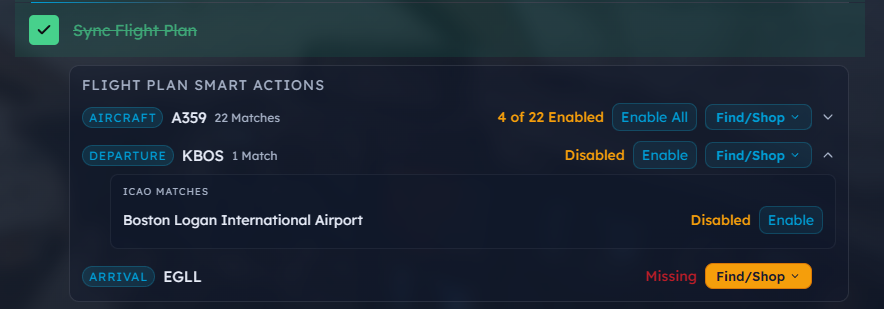
This update brings some great QOL improvements, as well as critical changes for Steam support. The Checklist now has “Tier 2” and “Tier 3” smart action matches for your addons, as well as options to find or purchase addons for your aircraft, arrival or departure airports. And to the user who has over 5,000 addons, thank you for requesting scrollbars. They have been enabled through the Library gear settings menu!
Added
Smart Actions Multi-Match - Smart Actions now return all matching addons per flight plan slot, not just the first
Tier 1: Exact ICAO match on the
icaofield (case-insensitive) for aircraft, departure, and arrivalTier 2: Automatic substring matching across displayName and packageName (runs on render, no manual trigger)
Tier 3: ICAO family expansion for aircraft — e.g., "A359" finds all A350-family addons via ICAO Doc 8643 dataset
New Find/Shop buttons (FS Addon Compare, Flightsim.to, iniBuilds, Contrail) for matching aircraft and airports
Checklist Set Activation - "Activate Addons" checklist step now supports selecting an entire addon set
Unified search picker in StepTemplateDrawer returns both sets and individual addons
Sets appear first in results with addon count badge and distinct visual indicator
Library Manager Scrollbars - Elegant auto-reveal scrollbar and scroll-to-top navigation
Centered "Back to top" pill button appears after scrolling 200px
Scrollbar visibility toggle in library settings gear menu (persisted via localStorage)
Global scrollbar hiding with
.scrollbar-elegantopt-in class
Multi-Simulator Detection - App now scans all four known MSFS installation paths and lets users choose
Detects MSFS 2024 (MS Store), MSFS 2024 (Steam), MSFS 2020 (MS Store), and MSFS 2020 (Steam) simultaneously
If one installation found: auto-confirms with "Choose a different simulator" escape hatch
If multiple found: shows selection cards with simulator name and Community folder path
Version Check - Clicking the version number in the title bar triggers a manual update check
Bypasses the 6-hour TTL so users can check on demand
Initial 5-second update check on launch also bypasses TTL so restarting within 6 hours won't skip it
Configurable Scan Depth Slider - Scan depth range slider (1–20, default 10) in the library settings gear menu
"Faster" / "Slower" labels with current numeric value display
Persists across app restart via localStorage
Rescan button moved from Libraries drawer into the settings menu alongside the slider
Changed
Direct Simulator EXE Launch - Probes for and launches the simulator executable directly with
-FastLaunch/-FastStartflags for MSFS 2024, falling back to store/Steam detection if EXE not foundSerde camelCase Cleanup - Rust
AddonandLibrarystructs now serialize as camelCase JSON over the Tauri bridge, eliminating all||fallback chains across 15+ frontend files
Removed
typeCodefield - Removed from Addon interface and all frontend components (field was never populated from database)Boeing/Airbus search term expansion - Removed
aircraftSearchTerms()regex-based type code munging in favor of exact ICAO matching